Hello,
I am trying to run a co-simulation between Simulink and BeamNG using FMU blocs. I did all the installation and test it with the examples and it works.
Now I am trying to do my own simulation that is implementing a new control strategy for the gearbox.
The problem is that the game don’t follow the “gear“ instruction that I send via the FMU bloc.
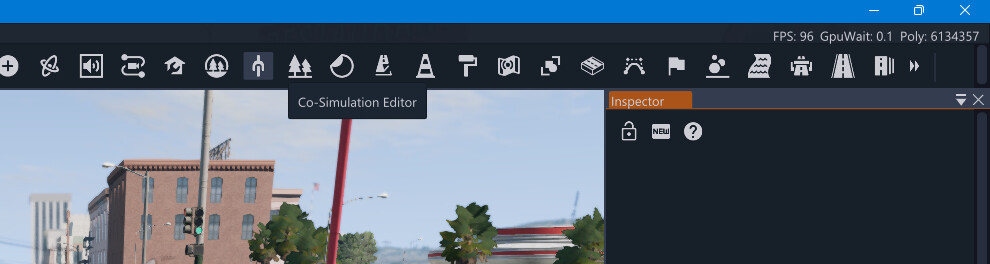
The second problem is that I want to try the S-function but I don’t find the Co-Simulation Editor in the World Editor Window.
Thank you for your help.
Hello @CAN1079,
1. Gear not being followed via FMU
Gear control from Simulink to BeamNG wasn’t handled in vehicle systems coupling controller. In vehicleSystemsCoupling.lua (which is the controller that is loaded by CTRL+V, for FMI demo) , add a handler for the gear input where other “from” signals are processed (around line 251):
local gearValue = decodedMessageFromSimulink[5]
if gearValue == gearValue and controller.mainController and controller.mainController.shiftToGearIndex then
  controller.mainController.shiftToGearIndex(math.floor(gearValue + 0.5))
end
Alternatively, For S-function co-simulation
You can use the gear input in S-function (till we add it to co-simulation editor; as it’s not there right now), with the cosimulationCoupling controller as same as FMI :
controller.loadControllerExternal('tech/cosimulationCoupling', 'cosimulationCoupling', {})
Use a CSV with the same signal list, including gear in the signalFrom section.
2. Co-Simulation Editor in the World Editor
The Co-Simulation Editor is in the top toolbar of the World Editor in BeamNG.tech. Open the World Editor with F11, then use the Co-Simulation Editor icon in that toolbar. If you don’t see it, make sure the toolbar isn’t collapsed or scrolled—it appears as an icon there rather than as a menu item.
If you need more details, the official docs are here: Co-Simulation Editor