Hello,
I would like to set up a repeatable dynamic driving simulation. (e.g., moose test with different vehicles and ESP/ESC settings)
I have read that this may be possible with the Python interface. Is there already an example or something similar for this?
Is this generally feasible with BeamNG?
Thank you very much for your answers.
Hello @Bastian,
The BeamNGpy should have everything you need to get this done. Take a look at this example. It covers basic scenario creation, object placements, vehicle spawning and automated control to get you started.
About switching ESC modes:
A lot of vehicles use the driveModes controller, which has multiple ESC modes. Some vehicles have simpler systems, where the esc controller is used.
It is not exposed to the Python through a specific function, but you can still do it by using the Python API to call Lua functions. Here’s some examples:
# Cycle/toggle ESC modes
BeamNGpy.queue_lua_command(f'be:queueObjectLua(scenetree.findObject("{Vehicle.vid}"):getID(), "if controller.getController(\\"driveModes\\") then controller.getController(\\"driveModes\\").nextDriveMode() else controller.getControllerSafe(\\"esc\\").toggleESCMode() end")')
# When using the driveModes controller you can select a specific ESC mode based on its key. The key is a string like "comfort", "sport", etc.
BeamNGpy.queue_lua_command(f'be:queueObjectLua(scenetree.findObject("{Vehicle.vid}"):getID(), "controller.getControllerSafe(\\"driveModes\\").setDriveMode(\\"comfort\\")")')
# You can also print the current ESC mode's key in the Lua console. This is useful for vehicles where the ESC mode's name doesn't directly correspond to its key .
BeamNGpy.queue_lua_command(f'be:queueObjectLua(scenetree.findObject("{Vehicle.vid}"):getID(), "print(controller.getControllerSafe(\\"driveModes\\").getCurrentDriveModeKey())")')
Make sure to replace BeamNGpy and Vehicle with your specific instances of these classes. You can find the documentation of this Python function here.
Hope this helps, let me know if you have any further questions.
Thanks for your reply.
I have already tried using ScriptEditor and AiManager to specify certain driving courses and then run them. However, I have discovered a problem here: although I can specify a route, e.g., in the moose test, using cruise control and manual control, the AI cannot repeat this route without knocking over a pylon.
This brings me to my next question:
Is the driving behavior different through the Python interface than through ScriptEditor?
Hello @Bastian,
If you create a trajectory in the SciptAI Editor, save it to a file and execute it using Python, then the behaviour would be the same. What’s causing your vehicle to hit the pylons? Is it following the trajectory too loosely, understeering, spinning out, or something else?
Hello,
Yes, the car follows the trajectory too loosely and, even with the assistants activated, fails to avoid hitting any pylons.
From this, I conclude that this problem cannot be solved with the Python application either?
Hello @Bastian,
Yes, the Python API won’t solve your problem. This might be fixable using the ScriptAI editor. In the trajectory’s menu there is an option “Fit Spline”. This option usually makes the vehicle try harder to follow the exact trajectory.
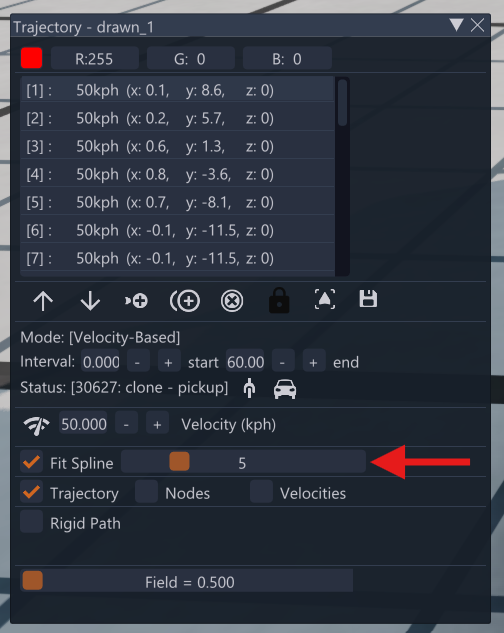
Hello,
Yes, I have already tried using the spline function, but I was unable to achieve any better solutions.
Although this allows the vehicle to stay on track more clearly, it loses the “realism” factor that I want to compare, as the vehicle is held almost as if on rails, contrary to physics.
Hello @Bastian,
The vehicle’s grip isn’t altered to artificially follow the set trajectory. Despite that, to get better results you can try using the Drive Path Editor instead. It offers more refined control by setting the width of the path that should be followed, aggression and some more things, which might be helpful in your use case.
Hello,
Thank you for your reply. I will try it with Drive Path Editor.
I have another question regarding the Python interface.
Is it possible to run or simulate long-term tests at a faster speed? For example, is it possible to compare the fuel consumption of a vehicle during a longer journey (which could possibly be simulated faster?) based on various factors such as load, aerodynamics, etc.?
Hello @Bastian,
Yes, you can run simulations faster than real-time using deterministic mode. This is perfect for fuel consumption tests.
Quick usage:
# Set 2x speedup

fpslimit, factor = 40, 2.0

iterations = int(20 / fpslimit * factor)

bng.control.queue_lua_command(f"settings.setValue('fpsLimit', {fpslimit})")

bng.control.queue_lua_command("settings.setValue('fpsLimitEnabled', true)")

bng.control.queue_lua_command(f"be:setPhysicsSpeedFactor({iterations})")
Documentation: Deterministic Mode
This allows you to run long journeys faster while maintaining accuracy for fuel consumption comparisons across different conditions, such as loads, aerodynamics, etc.
Best regards,
Abdulrahman
BeamNG.tech Team