Motivation
I am a researcher for driving behaviour research. Therefore my experiments involve in ony way or another a participant driving a vehicle on a given (map) scenario. In many cases this happens in our own map creations, specifically designed to introduce or enable a certain driving strategy. But map creation takes a lot of time.
Sometimes and with careful testing a BeamNG vanilla map like Italy is a really good compromise. But there are problems using vanilla maps:
- How to ensure the correct route is taken?
- I want the exact same route, but with 3 different speed limitations (street sign)
- but I dont want three versions of Italy in my gamefolder and a lot of loading screens
- I want to stay easily up to date to the current version of the map
After some initial tests we asked the BeamNG team for ideas
@epigova @asaeed @Brigo @HighDef
where we could not see a immediate solution but agreed on the relevance an potential of this question.
So we came up with a solution, with the least amount of code changed, have fun reading!
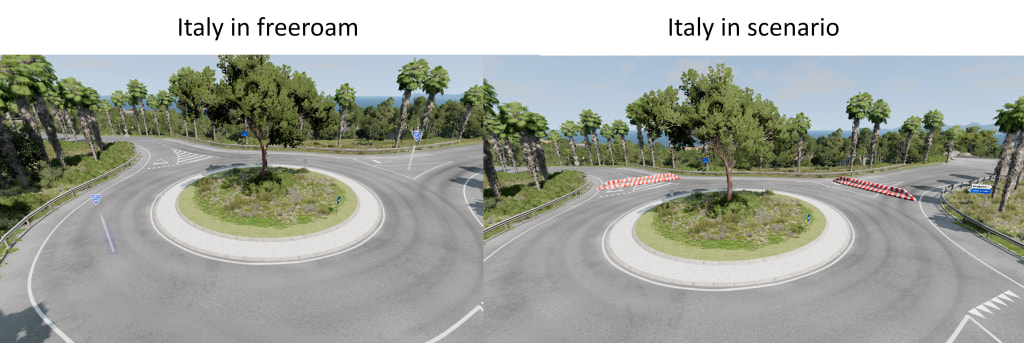
Two new scenarios are to be created with the official BeamNG map Italy, in which selected assets (such as traffic signs and road barriers) will be added. However, these assets should only be displayed in the scenarios and not during freeroam on the same map.
To ensure this, the following steps were carried out:
-
place all desired assets on the map.
-
combine the assets in a prefab.
-
select all newly placed assets
-
press the right mouse button
-
select Pack Prefab
-
-
certain assets are to be removed in the scenarios, these were packed in a prefab as in step 2.
-
open the flowgraph editor in the scenario
-
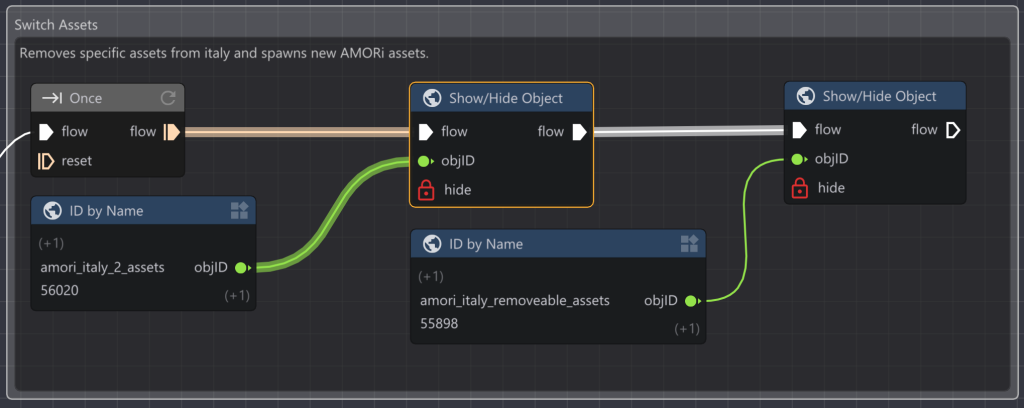
the following flow is attached to the Load Level node:
1.- the Show/Hide Object node is used to show the prefab with the newly placed assets and to hide the prefab with the assets to be removed
- the Object-ID of the prefabs often changes when the scenarios are reloaded, so this is determined using ID by Name nodes.
- the input pin hide determines whether the respective prefab is displayed or hidden.
Demonstration video
https://youtu.be/H4vP1BPTvcQ?feature=shared
Important notes
-
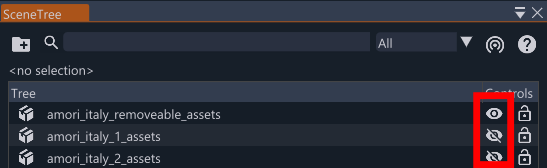
To ensure that the map does not show any of the newly placed assets during freeroam, but all of the original assets are displayed, only save the level if the display of the prefabs in the SceneTree is adjusted correctly. See:
-
In this example, the Spawn Prefab node is deliberately not used to ensure easy adjustment of the prefabs at any time and to prevent flying assets.